The Ultimate Free Guide to ASIC Miner Setup and Optimization for Beginners
Jump to Section
Entering the world of cryptocurrency mining can feel like a daunting task, especially when you are staring at a high-performance ASIC (Application-Specific Integrated Circuit) machine for the first time. Unlike a standard home computer, ASICs are industrial-grade machines designed for one purpose: solving cryptographic puzzles. This guide will walk you through the entire process from unboxing to hashing, ensuring your hardware is set up for maximum efficiency and longevity.
Unboxing and Initial Hardware Inspection
Before you plug anything in, a physical inspection is critical. ASIC miners travel long distances, often internationally, and the shipping process can be harsh. Even if the box looks pristine, the internal components might have shifted.
- The "Shake" Test: Gently tilt the miner from side to side. If you hear metallic rattling, a heat sink may have detached. Operating a miner with a loose heat sink can permanently damage the hash board.
- Visual Check: Inspect the fans for any broken blades or obstructions. Check the power ports for signs of scorching or bent pins.
- Serial Numbers: Take a photo of the serial numbers on the machine and the warranty stickers. This is vital for technical support or future resale.
Power Supply and Connectivity Requirements
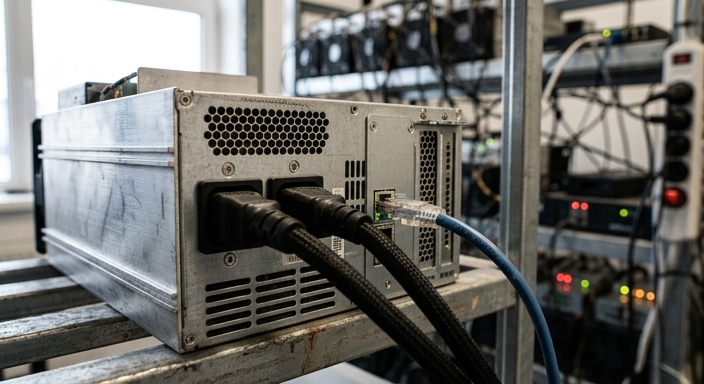
The biggest hurdle for beginners is power. Most commercial ASIC miners (like the Bitmain Antminer or Whatsminer series) require 220V-240V circuits. Using a standard North American 110V wall outlet will either trip your breaker or simply fail to power the machine.
You will need heavy-duty C13 or C19 power cables, depending on your model. Standard computer power cords are often too thin and can melt under the high current draw of a miner. For connectivity, always use a hardwired Ethernet connection. Wi-Fi is too unstable for mining; even a momentary drop in signal can result in "stale shares" and lost revenue.
Finding Your Miner and Accessing the Dashboard
ASIC miners do not have monitors. To configure them, you must access their internal web interface through another device on the same network. Once your miner is powered on and connected to the router, wait about two minutes for it to boot.
- Download an IP Scanner: Use a tool like "Advanced IP Scanner" (Windows) or "Angry IP Scanner" (Mac/Linux).
- Scan Your Network: Look for a device manufactured by "Bitmain," "MicroBT," or a generic name like "Antminer."
- Log In: Enter the miner's IP address into your web browser. A login prompt will appear. Default credentials are often
admin / adminorroot / root. (Consult your manual for specific default passwords).
Configuring Mining Pool Settings
Your miner is a worker; it needs a supervisor (a mining pool) to tell it what to do. Mining solo is virtually impossible for beginners, so you must join a pool to receive steady payouts.
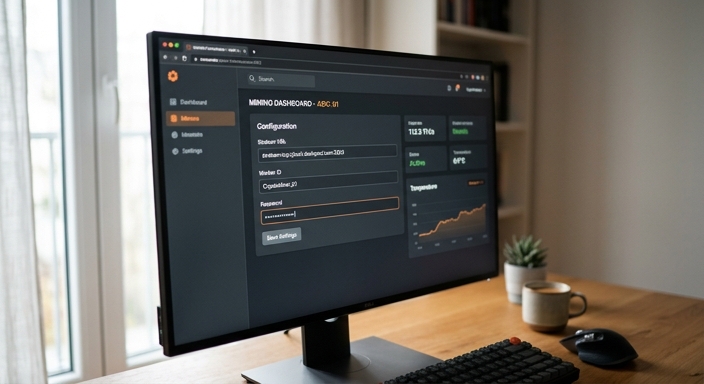
In the "Miner Configuration" or "Settings" tab of your dashboard, you will see fields for "Pool URL," "Worker Name," and "Password."
- Stratum URL: This is the address provided by your mining pool (e.g.,
stratum+tcp://btc.viabtc.com:3333). - Worker ID: Usually formatted as
YourUsername.WorkerName. - Password: Often left as 'x' or '123' as most pools do not require a worker-specific password.
Optimization and Environmental Tuning
Once the miner is hashing, the goal shifts from "running" to "optimizing." ASIC miners generate immense heat and noise. Proper environmental control is the difference between a machine lasting five years or five months.
Temperature Control: Aim to keep the intake air temperature below 35°C (95°F). If the miner gets too hot, it will "thermal throttle," reducing its hashrate to protect the chips. Firmware Updates: Check the manufacturer’s website for official firmware updates. These often include "Auto-Tuning" features that optimize individual chip voltages for better efficiency. Noise Management: If you are mining at home, consider an immersion cooling setup or a sound-dampening box, as these machines are as loud as a vacuum cleaner running 24/7.
Troubleshooting Common Setup Issues
If your miner isn't reaching its advertised hashrate, check the following:
- Dead Fans: Most miners will not start hashing if one fan is failing. Check the dashboard for fan RPMs.
- Network Latency: If you see a high percentage of "Rejected Shares," your internet connection may have high latency (ping).
- Voltage Drops: If the miner restarts frequently, your power circuit may be overloaded or providing unstable voltage.
Frequently Asked Questions
Can I run an ASIC miner in my bedroom?
It is not recommended. The noise level (75-85 dB) and heat output are significant. A dedicated garage, basement, or sound-insulated shed is much better.
How often should I clean my miner?
In a standard environment, use compressed air to blow out dust every 3-6 months. Dust buildup acts as an insulator and causes overheating.
Is it better to overclock or undervolt?
For beginners, undervolting (running at lower power) is often better as it increases efficiency and extends the life of the hardware. Overclocking increases revenue but also increases the risk of hardware failure.