The Ultimate Free Guide to ASIC Miner Maintenance: Prolonging Hardware Lifespan and Efficiency
Jump to Section
Investing in ASIC (Application-Specific Integrated Circuit) hardware is a significant capital commitment. Whether you are running a single Bitmain Antminer in your garage or managing a multi-megawatt industrial facility, the longevity of your hardware directly dictates your Return on Investment (ROI). Unlike general-purpose computers, ASIC miners are designed to run at 100% capacity, 24/7, in environments that are often less than sterile.
Regular maintenance is not just about keeping things clean; it’s about preventing "hashboard death," reducing power draw, and ensuring that every watt of electricity consumed is converted into the maximum possible hash rate. This guide covers the essential protocols for maintaining your ASIC fleet.
Why Maintenance Matters for Profitability
In the world of Bitcoin and altcoin mining, margins are often razor-thin. Hardware degradation leads to two primary issues: increased resistance (which leads to higher power consumption) and chip failure. When an ASIC chip fails, the entire hashboard may stop functioning, or worse, create a short circuit that damages the power supply.
By implementing a proactive maintenance schedule, you can extend the typical lifespan of a miner from 2-3 years to 5 years or more, significantly lowering your cost-per-terahash over the life of the machine.
Combating the Silent Killer: Dust Management
Dust is the most common cause of ASIC failure. It acts as an insulator, trapping heat against the chips and preventing the heat sinks from doing their job. Over time, dust can also become conductive if it absorbs moisture from the air, leading to short circuits on the hashboard.
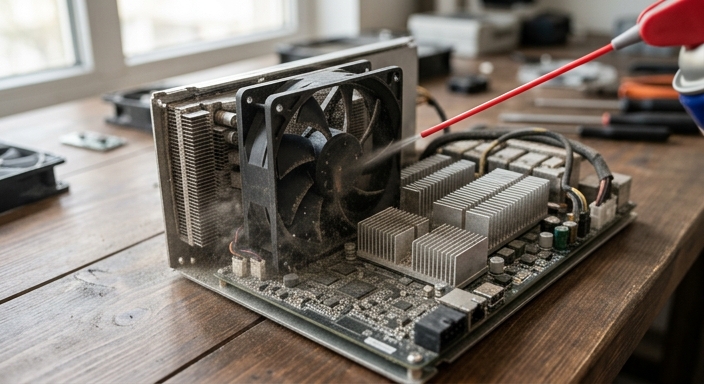
Step-by-Step Cleaning Protocol:
- Power Down: Always disconnect the PSU from the wall before opening or blowing out a miner.
- Compressed Air: Use an air compressor (with a moisture trap) or specialized electric duster. Blow air through the exhaust side toward the intake to dislodge stubborn particles.
- Fan Inspection: While the miner is open, manually spin the fans. If you feel resistance or hear a grinding noise, the bearings are failing, and the fan should be replaced immediately.
- Isopropyl Alcohol: For stubborn grime or "sticky" dust caused by high humidity, use 99% Isopropyl Alcohol and a soft brush to clean the hashboard contacts.
Thermal Management and Cooling Optimization
Heat is the byproduct of hashing. If your miner gets too hot, the onboard controller will throttle the frequency of the chips to protect them, leading to a drop in hash rate. This is known as thermal throttling.
- Ambient Temperature: Aim for an intake temperature between 20°C and 30°C. While miners can operate at higher temps, their efficiency (Joules per Terahash) drops.
- Airflow Pathing: Ensure there is a clear "Cold Aisle" and "Hot Aisle." You must prevent the hot exhaust air from being recirculated back into the intake.
- Ducting: Using shrouds and ducting to vent heat directly outside is one of the most effective ways to lower operating temperatures in home mining setups.
Power Supply Unit (PSU) Health and Maintenance
The PSU is the heart of your mining rig. It converts AC power from your outlet into the stable DC power required by the hashboards. PSUs are sensitive to heat and voltage fluctuations.
Ensure that your PSU cables are firmly seated. Loose 6-pin or busbar connections create electrical resistance, which generates extreme heat. This is the primary cause of "burnt" connectors. Every month, give your power cables a gentle "tug test" and look for any signs of discoloration or melting plastic on the connectors.
Software and Firmware Maintenance Strategies
Maintenance isn't just physical. The firmware controlling your miner plays a massive role in its health. Manufacturers frequently release updates that improve chip stability and fan control algorithms.
Consider using aftermarket firmware like Braiins OS+ or Vnish if your hardware supports it. These platforms often include "Autotuning" features. Autotuning checks the health of individual chips and adjusts the voltage/frequency for each one. This prevents "weak" chips from overheating and failing while maximizing the output of "strong" chips.
Routine Physical Inspection Checklist
Set a recurring calendar reminder to perform these checks every 30 days:
- Check Logs: Look for "HW" (Hardware Errors) in the miner status interface. A small number is normal, but a sudden spike indicates a failing chip.
- Check Fan RPM: Ensure both fans are spinning within 10% of their rated speeds.
- Visual Inspection: Look for any signs of "oil" leaking from thermal pads on the hashboards. If you see leakage, the boards may need re-padding soon.
- Network Stability: Ensure your Ethernet cables are not frayed and the switch is not overheating. High latency or packet loss can cause "stale shares," which is wasted electricity.
Frequently Asked Questions
Q: Can I run my ASIC in an immersion cooling tank to avoid maintenance?
A: Immersion cooling significantly reduces the need for dust cleaning and fan maintenance. However, it requires its own set of maintenance tasks, such as monitoring fluid dielectric levels and cleaning the heat exchanger.
Q: What should I do if my miner is showing a "Socket Error"?
A: This usually indicates a network issue or a failure in the controller board. Check your Ethernet connection first. If the error persists, try a factory reset of the firmware.
Q: Is it safe to use a vacuum cleaner to remove dust?
A: No. Vacuum cleaners can generate static electricity which can discharge and fry the sensitive ASIC chips. Always use compressed air or an electric blower designed for electronics.