The Ultimate Free Guide to ASIC Cooling and Noise Reduction: Pro Tips for Home Mining
Jump to Section
Mining Bitcoin or Altcoins from home is a rewarding venture, but it comes with two massive hurdles: the heat of a thousand suns and the sound of a jet engine in your spare bedroom. If you don't manage these factors, your hardware's lifespan will plummet, and your neighbors (or spouse) will lose their patience.
This guide provides a roadmap to transforming a noisy, overheating ASIC rig into a manageable, efficient home operation. We will cover everything from basic ducting to advanced immersion techniques.
Understanding the Thermal Load: Why ASICs Run Hot
An ASIC (Application-Specific Integrated Circuit) miner is essentially a heater that happens to calculate hashes. A single Antminer S19 can consume upwards of 3,250 watts. To put that in perspective, a standard space heater uses about 1,500 watts. Running an ASIC is like running two high-powered space heaters at maximum blast, 24/7.
The chips inside generate immense heat. If this heat isn't moved away from the hash boards immediately, the machine will thermal-throttle (slow down to protect itself) or suffer permanent chip failure. Effective cooling isn't just about blowing cold air; it's about heat displacement.
Airflow Fundamentals: The 80/20 of ASIC Cooling
The most common mistake home miners make is recirculating hot air. If your miner is in a closed room, it will eventually breathe its own exhaust, causing temperatures to spiral. You must establish a clear path for air:
- Cold Isle/Hot Isle: Ensure the "intake" side of the miner is pulling air from a cool source, and the "exhaust" side is pushing air directly out of the environment.
- Static Pressure: Use high-quality fans. Standard household fans cannot push air through the dense heat sinks of an ASIC. The built-in 120mm fans are designed for high static pressure for a reason.
- Cross Ventilation: If mining in a garage, use an intake fan at one end and an exhaust fan at the other to create a constant stream of fresh air.
Noise Reduction: Shrouds and Ducting Strategies
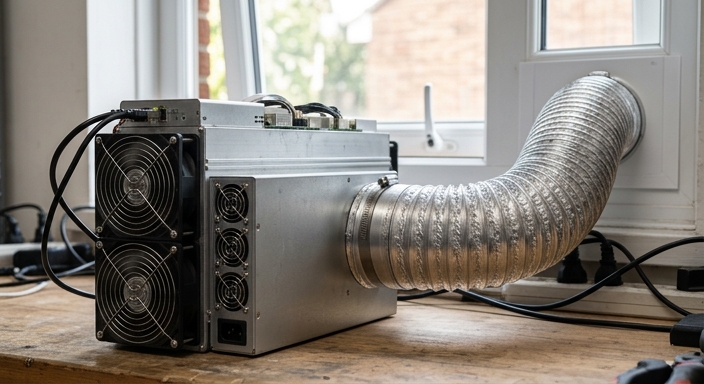
The "screaming" noise of an ASIC comes primarily from the high-RPM fans (often 6,000+ RPM). To dampen this without killing your machine, you need a "shroud" kit. A shroud is a 3D-printed or plastic adapter that fits over the 120mm fans, allowing you to attach 6-inch or 8-inch flexible ducting.
Pro Tip: Using insulated ducting (the kind with fiberglass or cotton padding) significantly reduces the high-pitched whine that travels through the air pipes. By venting the exhaust through insulated ducting and out a window, you remove both the heat and the majority of the noise from the room.

Building or Buying Soundproof Enclosures
If ducting isn't enough, you need a "Black Box" or a DIY soundproof enclosure. These boxes use the principle of sound baffling. Sound waves travel in straight lines; air can turn corners. By creating an "S" shaped path (a labyrinth) lined with acoustic foam or Rockwool, the air can move through while the sound waves bounce off the absorbent material and dissipate.
When building a box, ensure the internal volume is large enough that you don't create "backpressure." If the miner struggles to push air through the box, it will overheat. Always monitor your "PCB temperatures" via the ASIC's web interface when testing a new enclosure.
The Next Level: Immersion vs. Hydro Cooling
For those who want near-silence and maximum efficiency, air cooling is no longer the gold standard.
- Immersion Cooling: The entire ASIC is submerged in a non-conductive dielectric fluid. The fluid carries heat away 1,200x more effectively than air. This requires a tank, a pump, and a dry cooler (heat exchanger). It is expensive but allows for massive overclocking and zero fan noise.
- Hydro Cooling: Modern miners like the Antminer S19 Pro+ Hyd. use water blocks directly on the chips. You connect these to a water loop and a radiator. This is more compact than immersion and very effective for residential settings where you can hide a radiator outside.
Environmental Monitoring and Safety
Never "set it and forget it" when it comes to cooling. A failed exhaust fan can lead to a fire hazard or melted equipment within minutes. Use a smart home ecosystem to protect your investment:
- Smart Temperature Sensors: Place sensors near the intake. If the room hits 100°F (38°C), have an automation that cuts power to the miners.
- Smart Plugs/PDU: Use heavy-duty PDUs (Power Distribution Units) that allow for remote power cycling.
- Automated Shutdowns: Use firmware like Braiins OS+ or VNish which have "Auto-Shutdown" features if the chips reach a certain threshold.
Frequently Asked Questions
What is the ideal operating temperature for an ASIC?
Most ASICs prefer an intake temperature between 50°F and 85°F (10°C - 30°C). While they can run hotter, chip longevity significantly decreases once intake air exceeds 95°F.
Can I replace ASIC fans with quiet PC fans?
Generally, no. Standard PC fans (like Noctua) usually don't have the static pressure required to push air through the tightly packed heat sinks of a miner. You will likely see "Fan Error" or immediate overheating unless you use a "fan spoofer" and have an external high-power blower.
Does humidity affect ASIC mining?
Yes. Very high humidity (above 80%) can cause corrosion, while very low humidity (below 20%) increases the risk of static discharge. Aim for 40-60% relative humidity.